

How the inventory check time was cut by 60% by implementing automated product data export in SAP NetWeaver
There is a specific kind of work that feels longer than it is. Typing the same field into software fifty or sixty times in a row is one of those things. Until someone decided to stop doing manually a process that can and has to be automated.
Inventory verification procedures in many organizations remain partially manual despite the presence of centralized enterprise systems. This case describes a practical implementation that reduced inventory preparation time by up to 60 percent by automating the extraction of product quantity and storage location data from SAP NetWeaver. The solution replaced repetitive manual lookups with a structured data export and transformation workflow, allowing employees to focus on physical verification rather than data retrieval.
Initial process and operational constraints
The local subdivision of the company received, on a weekly basis, a list of products that required inventory verification. The list was provided by higher management and typically contained up to one hundred items. Each entry included only the material ID and product name, without any logistical data such as storage location or available quantity.
A representative example of such a list is shown below:
- N936034 GUIDE
- 523461 BUMPER
- 182960 CHECK SEAL
- 180646 SEAL HEAD VALVE
- 180648 O-RING 36.5MMX2.0MM
- N905272 PISTON RING
- 186205-K DRIVER SA
- 180059 O-RING45.7MMX2.6MM
To prepare for the physical inventory check, employees were required to retrieve additional data for each material from the business management system, which in this case was SAP NetWeaver. The workflow consisted of the following manual steps:
- Entering the material ID into the system interface
- Navigating to Common > Materials Management > Display > Stock Overview
- Retrieving storage location and available quantity
- Transcribing the retrieved data into a paper-based checklist
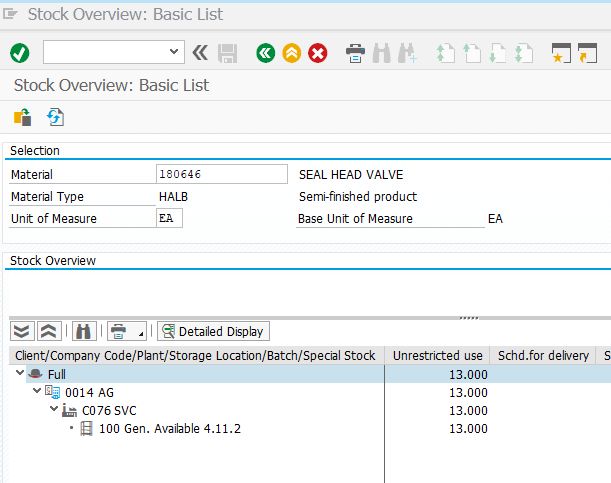
For each item, this process required approximately one minute under normal conditions. For a list of 60 items, a single employee spent between one and one and a half hours performing data lookup and transcription alone. Since multiple employees were involved in each inventory check, the total time spent on this preparatory stage could reach four to five hours collectively before any physical verification began.
The resulting dataset for each material resembled the following structure:
- Material part number ID: 180646
- Material name: SEAL HEAD VALVE
- Storage location: 4.11.2
- Quantity available: 13
Only after this manual preparation could employees proceed to the warehouse to verify actual stock levels against system records.
Identified inefficiencies
The process exhibited several inefficiencies that directly impacted productivity:
- Repetitive manual data entry for each material
- High dependency on user accuracy during transcription
- Significant time consumption before starting the actual inventory check
- Low employee engagement due to monotonous tasks
Solution overview
The implemented solution focused on automating the extraction of inventory data from SAP NetWeaver and preparing a prefilled dataset for employees. Instead of manually querying each material, the system generated a comprehensive export containing material numbers, storage locations, and available quantities.
This approach transformed the workflow into a two-stage process, skipping tedious monotone process, making it much quicker and leaving employees more happy.
Step 1: Extracting inventory data from SAP NetWeaver
The SAP table used for inventory tracking is MARD, which contains plant-level storage data for materials. This table can be accessed using transaction codes SE16 or SE16N, with SE16N providing a more modern interface.
Accessing and configuring table MARD
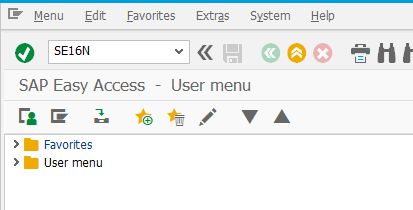
- In SAP enter transaction code SE16N
- In SE16N input table name MARD
- Deselect all fields except MATNR (Material number ID), WERKS (Plant – the codename of the business division), LGPBE (Product storage bin), LABST (Unrestricted quantity - stock quantity that is available to use and is not currently reserved by any job order)
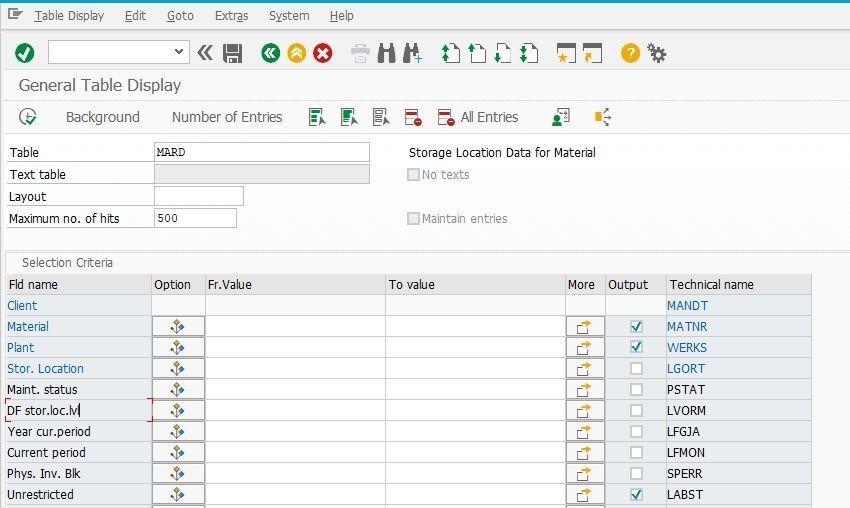
- Specify plant (WERKS) to select inventory that belongs to your business division, for example C076
- Leave MATNR empty to include all materials
- Leave LABST empty to include goods with zero quantity (not in stock) or set for this field a condition greater or equal to one (>=1)
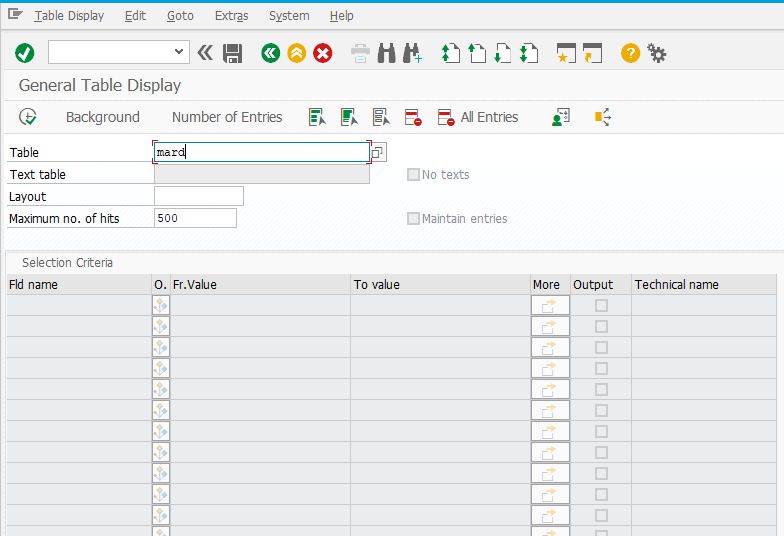
By default, SAP limits the number of returned records. To ensure a complete inventory dataset is included:
- Clear the "Maximum No. of Hits" field or set a sufficiently large value such as 999999
- Execute the query using F8
The MARD table only includes entries for materials that have been assigned to specific storage locations. Materials that exist in the plant but have not been extended to a storage location will not appear in the result set.
Filtering out zero stock materials
To exclude materials without available stock one needs to set a filter condition for the LABST (unrestricted stock) field:
- Locate field LABST in the MARD table
- Click on the Option button within the filed (has an icon of a vertical tree with branches-conditions)
- In the Select set of conditions (these have green icons) use the Greater than/Equal to condition (it has >= icon)
- In the value cell of the field set 1 for the system to select only goods with quantity greater than or equal to one.
- Execute the query by pressing the icon of green checkmark on clock face at the top left part of the SAP window.
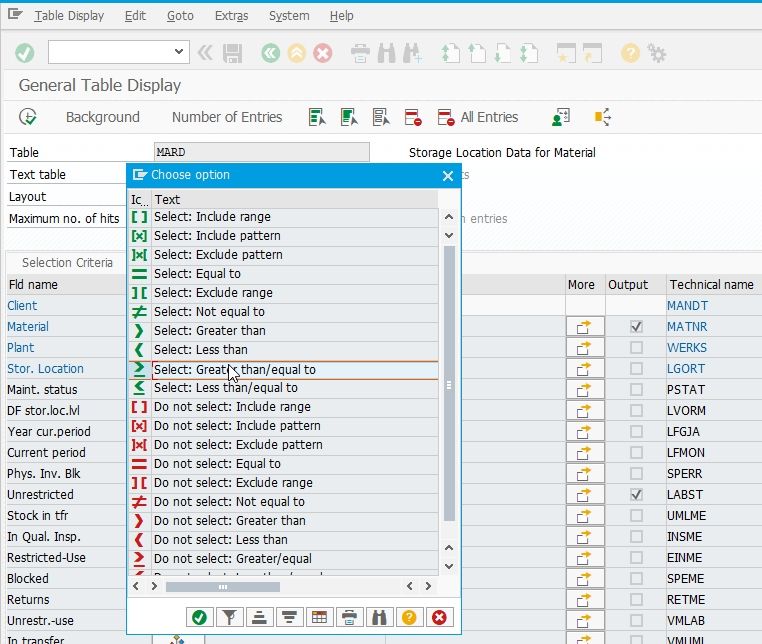
This ensures that the exported dataset contains only relevant materials with actual inventory.
Step 2: Exporting inventory data to Excel
Once the data is displayed in the SAP grid, it can be exported directly into a spreadsheet format.
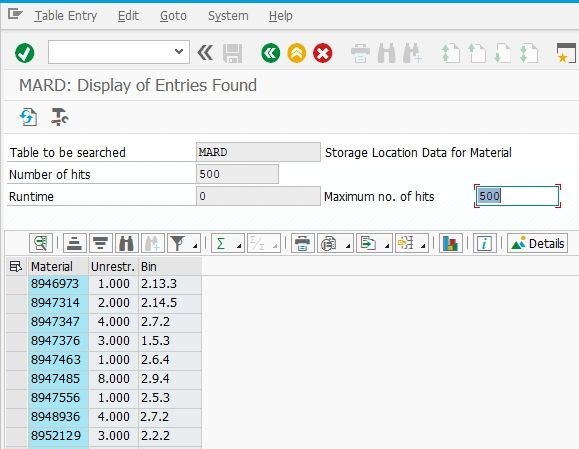
- Click the spreadsheet export icon in the toolbar
- Alternatively use List > Export > Spreadsheet
- Select Excel XLSX format for compatibility with large datasets
- Specify file name and location for the file to be saved
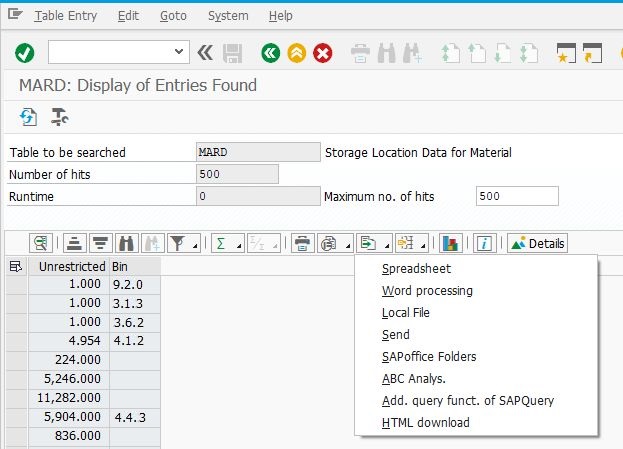
The resulting file contains a complete snapshot of inventory data, including material IDs, storage bins, and quantities.
Step 3: Mapping target products to their location in Excel
The exported SAP dataset is then cross-searched with the original list of materials received from management. This is performed using Excel lookup functions.
Add a new sheet in the exported Excel file. In the example below the Sheet 1 is a target list of materials to be checked, and Sheet 2 contains full SAP export from table MARD
Important data handling note for Excel
Before importing any data into Excel spreadsheet ensure the Material ID columns are formatted as Text.
Excel is preconfigured to process long numeric values as dates. For example, an ID 180648 will be converted in Excel into a date 5 AUG 1994.
Once a long number is paste in a cell formatted as General, Excel quietly makes the conversion. There is no option to undo this conversion later. Once such quiet conversion of formats happens, the search will return NOT FOUND.
For example, if a products has an ID N180648, Excel will not attempt to convert it into date format and the search will find this value. If the product ID is 180648, Excel may quietly convert it into date format, and search returns NOT FOUND whel searching for 180648 number.
This behavior must be prevented by explicitly formatting the column as text before inserting data into Excel spreadsheet.
Using XLOOKUP function for mapping
The XLOOKUP function is used to retrieve storage location and quantity for each material from the SAP export.
To map the Storage bin location use the formula. Replace the column letters that correspond to your file:
=XLOOKUP(A2, 'Sheet2'!$A:$A, 'Sheet2'!$C:$C, "Not Found")
- A2: the cell with Material ID in the target list
- Sheet2 column A: column to search in SAP export for Material ID in A2 cell of target sheet.
- Sheet2 column C: column with Storage bin data in SAP export.
This produces a prefilled table containing storage bin data for the inventory check.
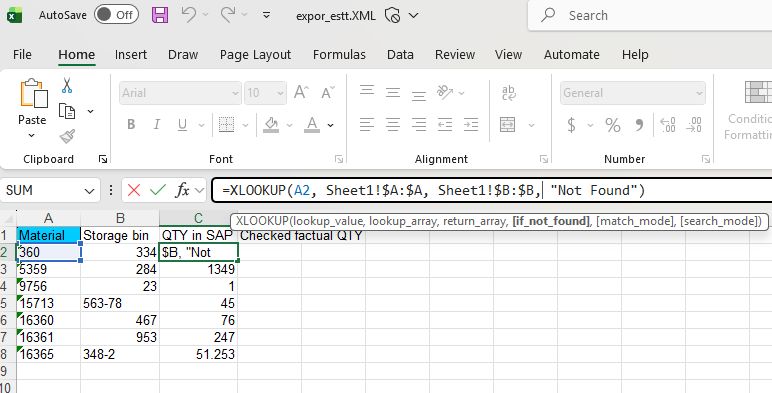
Reuse the XLOOKUP formula for the column that contains unrestricted stock quantity.
Drag these formulas for every Material ID in the target list.
Handling multiple storage locations per Material ID.
The case above describes a solution for a warehouse with a single storage bin per product ID.
If a material is stored across multiple bins, the lookup function returns only the first match. In such cases, aggregation techniques such as pivot tables should be applied to consolidate quantities across locations.
Conclusion
For a long time, several hours each week were spent on a task that had no real value on its own. During that time, employees were not doing inventory checks or any other useful work. They were doing computer’s job - copying data from the business operation system into another table, one item at a time. The data was being accessed in the slowest possible way, and the process remained unchanged despite how much time it consumed.
Once the automated export of storage location and quantity was introduced, that part of the process disappeared. The list arrives, the data is already attached to it, and the work starts from the point that actually matters.
Up to 50-60 percent of the preparation time is now removed.
The inventory check itself did not become easier or more enjoyable. It simply stopped being preceded by an hour of unnecessary work.
The result is a shorter process achieved through a minor change that required no modification of the core system. What had been accepted as normal routine turned out to be avoidable.