

How to make a Wordpress website to save Unicode without destroying Unicode:
blog converts ☺ into ? marks
WordPress is designed to handle multilingual content, yet some blog instances traces back to an outdated or misconfigured database encoding, corrupting Unicode symbols the moment an article is saved.
Unicode characters like “→”, “☺”, or “×” appear correctly in the editor, only to turn into “?” after publishing. The result is data loss that cannot be reversed once the content is stored.
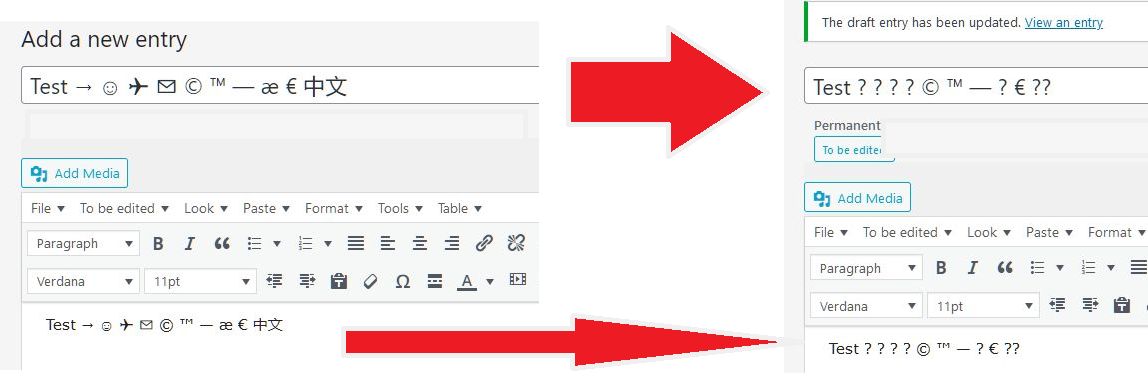
The root cause of this buggy online blog behavior lays within the pipeline when WordPress passes the text through PHP and MySQL. The connection or storage layer converts every non-ASCII character into a placeholder, which is displayed in browser as ? mark.
The correct solution is to reconfigure the pipeline to correctly process Unicode. For example, to ensure Wordpress config file wp-config.php defines UTF-8, or change SQL database tables encoding to utf8mb4.
This correct solution, however, has a major downfall that lays not in the technical, but in a policy realm. It can be executed only when higher supervisors and managers allow to do so.
In a particular case of one Wordpress-based blog under the prolonged IT support, there was no chance of obtaining a policy change. This pushed for a solution that relied solely on access rights and tools available through the Wordpress blog admin panel.
Solution: automatically convert Unicode into HTML entities during post saving
Browsers and apps always had problems of correct displaying Unicode symbols – for roughly 15 to 20 years. Legacy websites, email clients, blogging platforms kept breaking Unicode until well into the 2010s.
However, World Wide Web Consortium (W3C) team, who is responsible for internet standards, have long before developed so-called HTML entities - set of ASCII symbols to be a safe variant for characters that couldn’t appear on display without breaking themselves.
The solution for the particular Wordpress blog in discussion was straightforward. If the blog ruins Unicode, and works only with ASCII character set, then convert Unicode into HTML entities, which are ASCII-based.
For example, the Unicode’s 🙂 will be stored as 🙂 HTML entity. Despite the smiley face has become invisible with new encoding, browser will render the HTML entity as a smiley face.
Here are some more examples of Unicode to HTML entity conversion:
- → becomes →
- © becomes ©
- × becomes ×
- ½ becomes ½
- ⁈ becomes ⁈
Setup custom code snippet to convert Unicode into HTML entity
One can manually replace each Unicode symbol as HTML entity before publishing, however, this approach is tedious and prone to errors. To automate the process a PHP code snippet can be used, which hooks into WordPress’s content_save_pre filter. When launched before the post is published, the snippet converts Unicode --> HTML entities, making content to be saved into the database without data loss.
It was not viable to modify functions.php file directly due to lack of FTP access to the Wordpress installation. However, a plugin Code Snippets exists, which lets to add required hooks from the Wordpress admin panel.
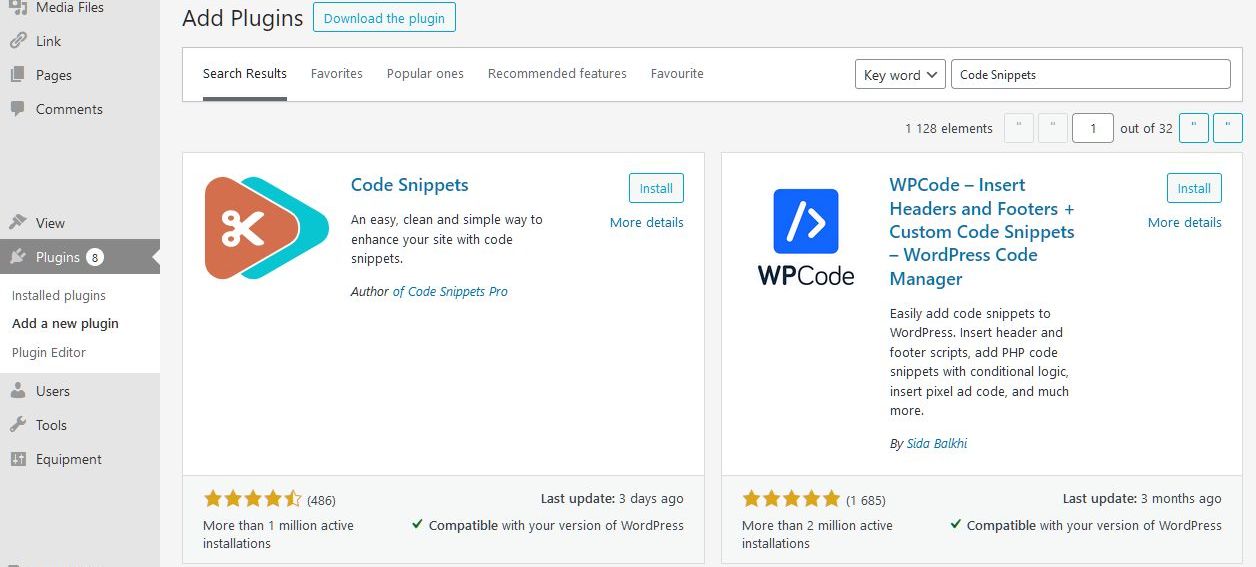
Installing the Code Snippets plugin is straightforward and executed from Plugins page of the Wordpress admin panel. Click Add New button, type Code Snippets (author: Code Snippets Pro) in the search field, and click Install Now, then click Activate.
Add custom PHP code to convert Unicode into HTML entity
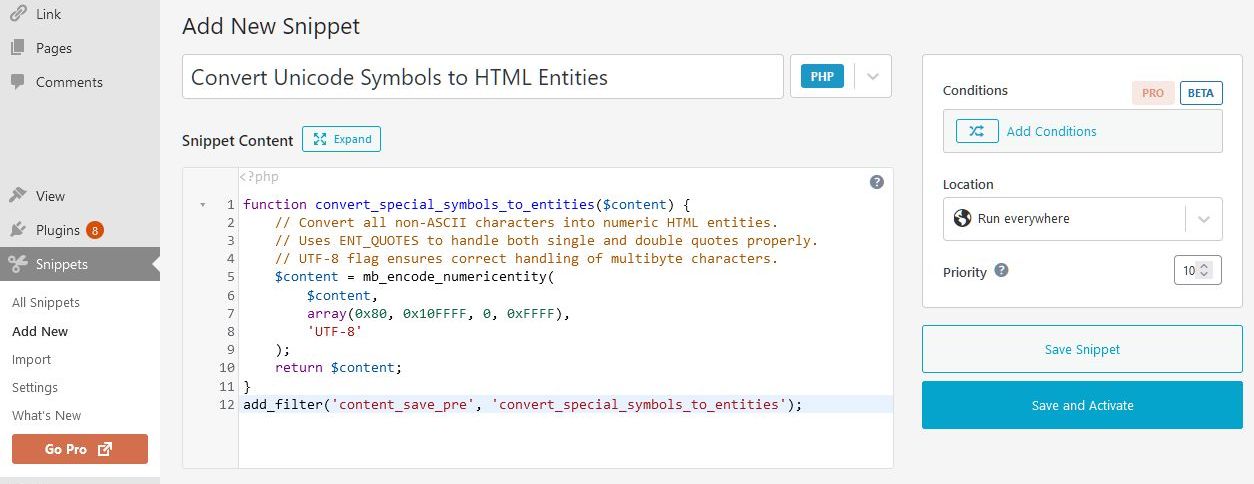
After Code Snippets installed, a new Snippets tab will appear in Wordpress admin. Open it and add a new snippet. Set snippet to run only in admin panel.
At first, a straightforward PHP converter code was utilized:
function convert_special_symbols_to_entities($content) {
    // Convert all non-ASCII characters into numeric HTML entities.
    // Uses ENT_QUOTES to handle both single and double quotes properly.
    // UTF-8 flag ensures correct handling of multibyte characters.
    $content = mb_encode_numericentity(
        $content,
        array(0x80, 0x10FFFF, 0, 0xFFFF),
        'UTF-8'
    );
    return $content;
}
add_filter('content_save_pre', 'convert_special_symbols_to_entities');
This code worked and did what was required – looked up for any Unicode symbol within the post content, and converted that symbol into HTML entity.
However, optimization problem immediately popped up. Post publishing time increased dramatically even for short posts. The reason for that was because the code snippet was not optimized. It fires a built-in PHP function mb_encode_numericentity() that scans a UTF-8 string, covering all Unicode, including obscure symbols. This code scans every single byte in the string to check if it needs encoding, which becomes painfully slow for a long string.
Optimized PHP code to convert Unicode into HTML entity
The code above analyzes every symbol in the string, even symbols that are within the ASCII encoding table. ASCII symbols can be omitted, since they have no problem with their display.
Also, there is no need to cover all emoji and exotic symbols Unicode has. A realistic approach is to cutoff scanning on popular symbols and multilingual characters.
Additionally, the code above does not assume for characters used in the HTML, for example the < and >. When converted to HTML entities, such symbols will not be recognized by browser as a part of HTML code, breaking the page formatting. To count for such occurrences, the mb_encode_numericentity() PHP function was replaced with the mb_convert_encoding() function. The latter takes a higher-level approach, relying PHP’s encoding subsystem.
From a CPU load standpoint, mb_convert_encoding() runs almost entirely in native code and operates on buffered memory. This means the execution time during post publishing has minimal overhead even for long posts. The mb_encode_numericentity() performs repeated pattern checks and substitutions in PHP, which requires a dramatic amount of time for long texts.
The final optimized code snippet:
function convert_special_symbols_to_entities($content) {
    if (preg_match('/^[\x00-\x7F]*$/', $content)) {
        return $content;
    }
    return mb_convert_encoding($content, 'HTML-ENTITIES', 'UTF-8');
}
add_filter('content_save_pre', 'convert_special_symbols_to_entities');
This small block of code is deciphered as follows:
function convert_special_symbols_to_entities($content)
This line declares a function, which takes one argument, which holds the complete, unsanitized text that a user entered in the editor.if (preg_match('/^[\\x00\-\\x7F]*$/', $content))
This condition performs an early check using a regular expression declared within preg_match. The pattern(preg_match('/^[\\x00\-\\x7F]*$/', $content))matches a string that contains only ASCII characters. If the text matches this pattern, it means there are no Unicode characters, so there’s nothing to convert and CPU-consuming conversion load is skipped. This condition exists for efficiency.return mb_convert_encoding($content, 'HTML-ENTITIES', 'UTF-8');
If the regex finds Unicode (at least one non-ASCII symbol) that string is passed to mb_convert_encoding().mb_convert_encoding()
This function constructs a new string that contains only ASCII symbols by replacing any character outside the ASCII range with its HTML entity equivalent.add_filter('content_save_pre', 'convert_special_symbols_to_entities');
This line attaches the snippet code to WordPress’s internal filter system. WordPress fires the content_save_pre filter before saving the post content in the database.
From this point onward, every time a post is saved - either manually or automatically via autosave - WordPress will pass the post content through our code snippet. Because final returned post content contains only ASCII characters and HTML entities, no data corruption can occur even if the database uses a single-byte encoding.