

How to make a temperature logger from an old Android phone
Old Android phones can do more than sit in a drawer. With BatteryTemperatureDisplay app, they can serve as fully functional temperature loggers that help detect overheating, monitor environments, and even warn about safety risks. The app operates entirely on internal Android features - no external sensors required - and continuously tracks and records battery temperature in the background.
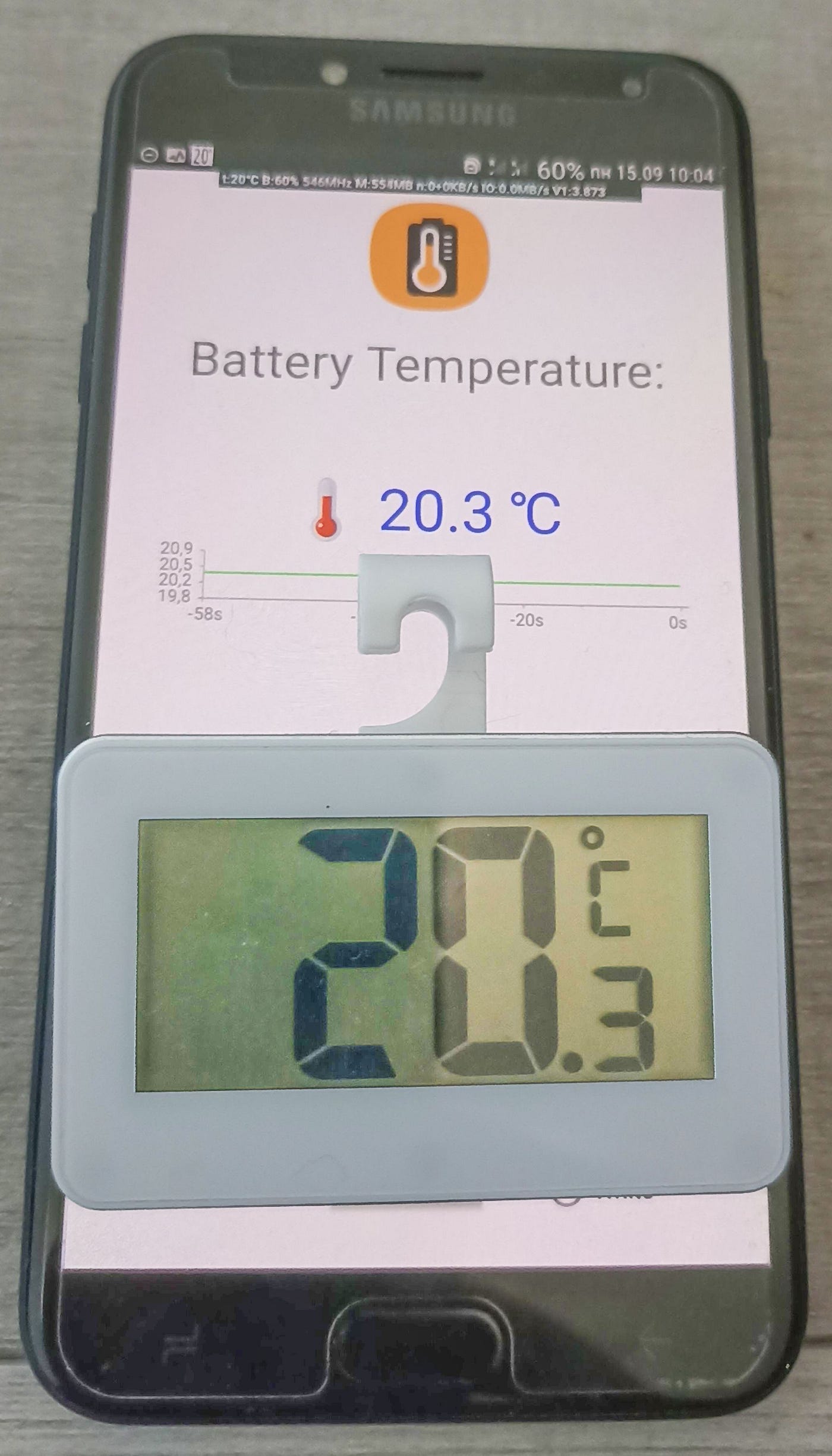
Modern Android devices contain more sensors than most people realize, and one of the most overlooked is the battery’s internal temperature sensor. Normally, the system uses it only to prevent overheating during charging or gaming, but with the right software, it can become a practical, autonomous environmental logger.
BatteryTemperatureDisplay is designed precisely for that purpose: it transforms any unused smartphone into a background temperature monitoring station - recording, displaying, and alerting in real time.
Purpose and concept of the temp logger
The central idea behind BatteryTemperatureDisplay is straightforward. Every Android battery already exposes its battery temperature via the system broadcast ACTION_BATTERY_CHANGED. Instead of ignoring that information, as clean Android does, the app continuously reads it, displays it as a live value, and stores it in a CSV file for later analysis.
In essence, it gives users a transparent, data-driven view of how heat accumulates and dissipates in their devices. Beyond technical curiosity, this capability has a real-world role: by monitoring internal temperature, users can detect thermal irregularities before they lead to performance degradation or physical damage.
What the app measures
Android system keeps the battery’s internal temperature value updated as a tenth of a degree in Celsius. Respective Java class of the app provides a function to extract and convert it into a float:
intent.getIntExtra(BatteryManager.EXTRA_TEMPERATURE, 0) / 10f;
That is the raw data source for everything else. It is direct hardware feedback - no external sensor needed.
How the app works
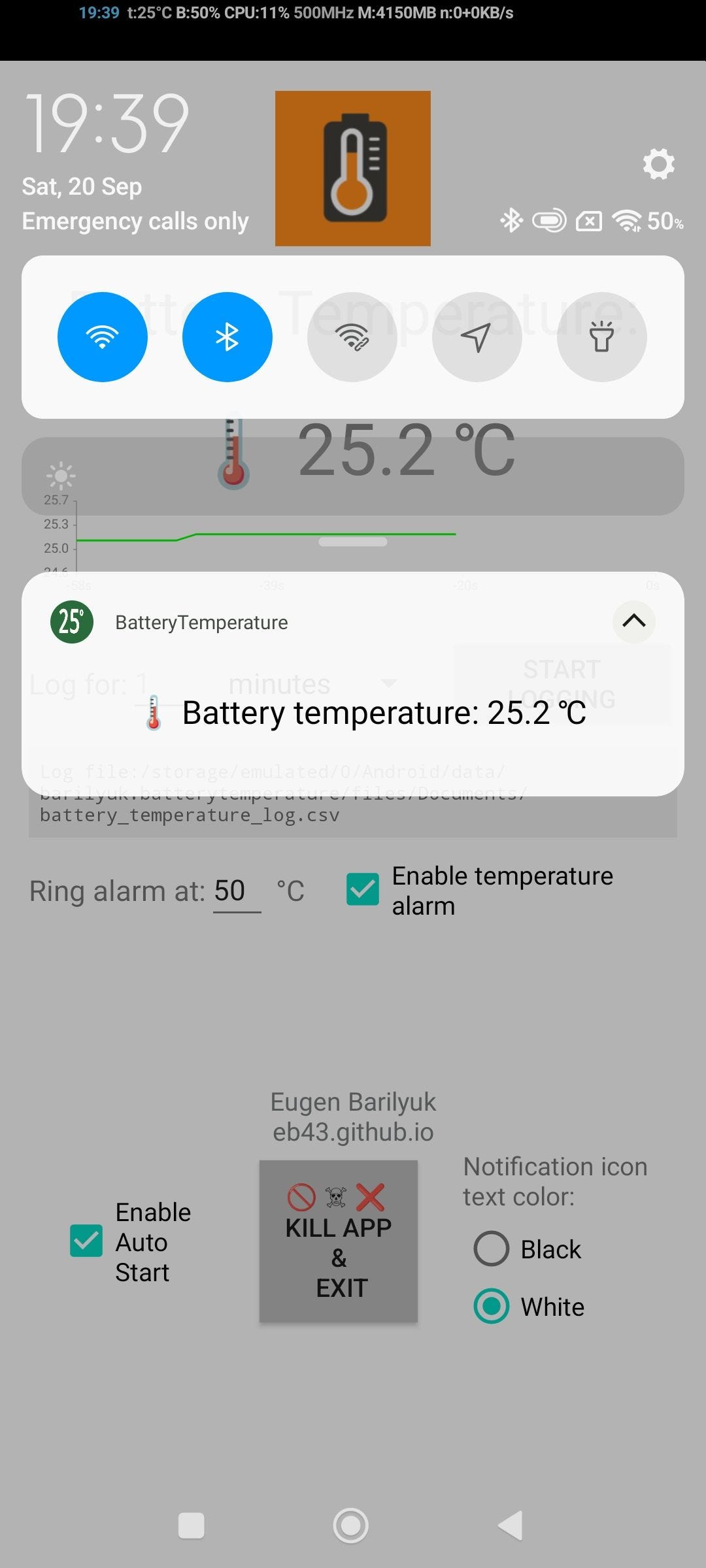
The central app process runs as a foreground service. It registers a receiver for battery-change broadcasts and keeps the latest temperature visible through a permanent notification in the status bar.
Through a nifty approach, app overcomes the Android limitation on static app icon, displaying a dynamically updated temperature value always visible over other apps.
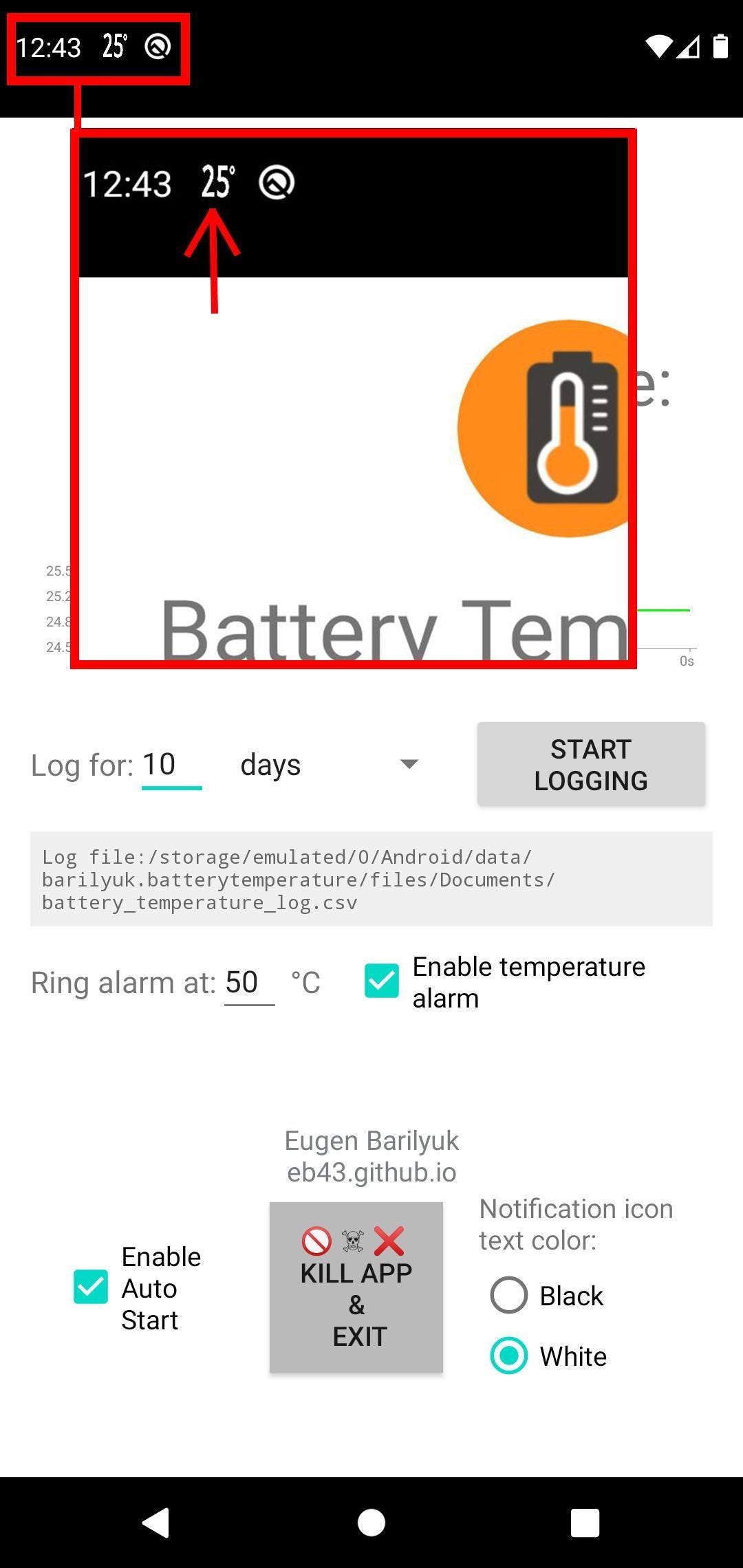
Running in the foreground prevents Android from pausing or killing it during memory cleanup, so the phone can reliably log temperature even with the screen off.
Whenever the user wants, he can record temperature in a CSV file located in the app’s external documents directory. The file format is plain text CSV, with each line containing a timestamp and measured temperature, suitable for importing into Excel, Google Sheets, or any other spreadsheet program for data analysis. The temperature log file can be shared by clicking on the file path within the app or accessed via any file manager.
Then, every time the battery temperature changes, it appends a new row with a timestamp and event type ("Temperature Change", "Alarm Triggered", "Logging Expired"). The logic is barebone but reliable - sufficient for use in unattended monitoring scenarios.
The user can stop or start the logging from the app main screen. Preferences such as threshold temperature, logging duration, and measurement interval are stored in SharedPreferences, so they persist after reboot.
Real-time temperature display
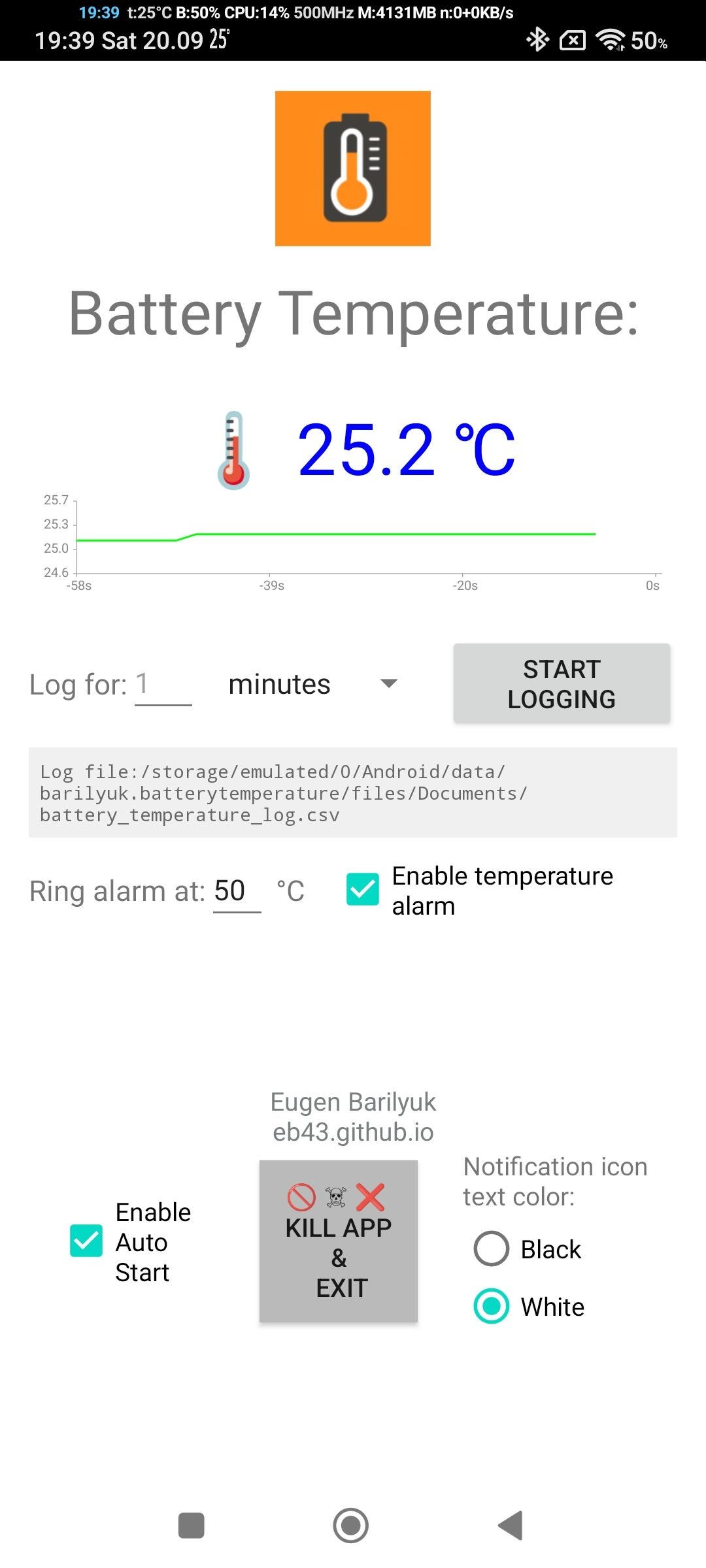
For visual enhancement of the app UI, the app uses a custom canvas view that draws a continuous scrolling line chart of recent readings. It dynamically scales the vertical axis according to current min and max values and shows a neat dynamic graphical chart of recent temperature trend. The implementation avoids third-party libraries and GPU-heavy effects; its goal is to display data without adding measurable heat load itself.
Temperature alarm feature
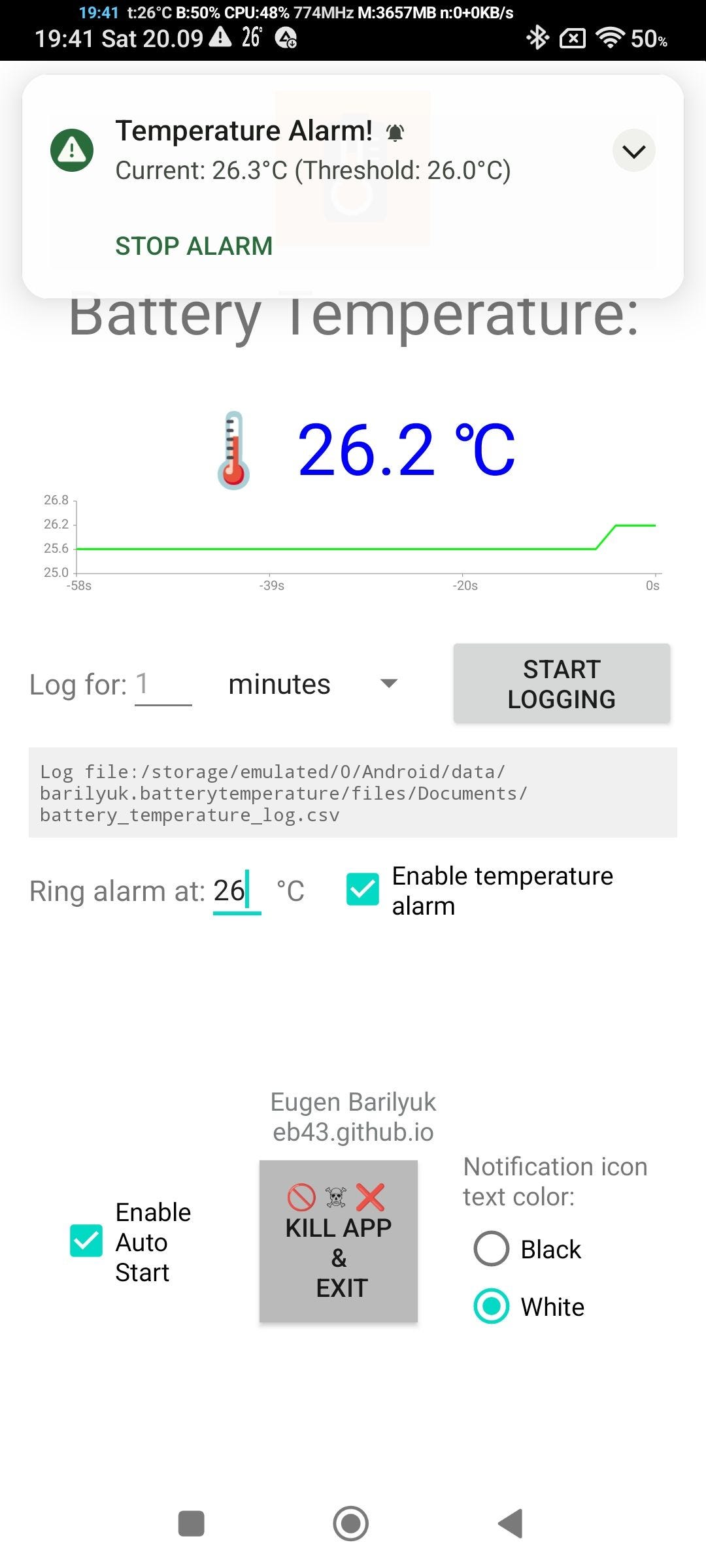
A user can avoid dangerous overheating or freezing situation by setting a sound alarm triggered by the temperature. When temperature rises above the user-defined limit, app launches a short audible alarm through a MediaPlayer instance. A handler stops playback automatically after 20 seconds (the value ALARM_AUTO_STOP_DURATION is hardcoded) to avoid infinite looping. The alarm only triggers once per event and resets when the temperature drops below the threshold.
Technical efficiency and design philosophy
BatteryTemperatureDisplay deliberately avoids heavy frameworks or external dependencies. The logic is implemented using only Android’s native APIs, which makes the app compact and energy-efficient.
Its background service architecture follows Android’s best practices for persistent tasks - foreground notification, controlled handlers, and scoped file I/O. The logging procedure ensures data integrity without blocking UI threads, and the graphical view operates entirely on lightweight canvas drawing rather than costly charting libraries.
This structure reflects a fundamental engineering principle: functionality through simplicity. Each class performs a single role, clearly separated yet interconnected through well-defined method calls.
When temperature tracking is useful
The app provides early awareness - both through visual feedback and an audible alarm. When used during charging, heavy processing, or hot outdoor conditions, it warns before critical levels are reached. Users can analyze their logs to identify recurring causes of thermal trends.
This makes an old smartphone ideal for a wide range of applications:
- 🌱 Greenhouse monitoring: Detect temperature fluctuations that affect plant health before visible symptoms appear.
- 🐕 Animal barn tracking: Maintain stable environmental conditions for animals sensitive to heat or cold.
- 🏠 Home insulation assessment: Identify areas with poor thermal insulation by placing the phone in different rooms.
- 🛏 Sleep comfort analysis: Log temperature with phone placed between bed sheets to evaluate heat retention and optimize bedding materials.
- 🚗 Hot car safety: Leave the phone inside a parked car to get early alerts when interior temperatures become unsafe for children or pets.
- 🥶 Food safety: Keep your food safe during camping or power outages by monitoring that temperatures remain below +4 °C, which is a critical point for stagnating bacterial growth.
- ❄ Cold-weather readiness: Track body heat retention in winter conditions and prevent hypothermia.
- 🏃 Heat stroke prevention: Use the phone during outdoor activity in summer - if the phone in your pocket reaches 40 °C, conditions are hazardous.
Beyond those scenarios, the app can also help to protect the Android phone you use now, increasing its safety and longevity:
🧩 Processor protection
Phones do not have cooling system. Phone processor can only transfer the heat into other parts of the phone with vapour chambers and heat pipes only helping to transfer the heat. Your phone’s battery acts as a main heat sink for the processor, and when it gets hot, phone processor melts and starts throttling to avoid instant death.
During heavy load high battery temperature indicates that the processor itself is running dangerously hot. Over time, these repeated heating stress cycles can lead to solder fatigue and, eventually, device failure. iPhone, Xiaomi, Opo, Samsung and other brands have phones that die due to repeated thermal stress and solder fatigue of the processor.
Monitoring battery temperature helps extend your phone’s functional life.
⚠ Fire risk reduction
At around 50 °C, lithium-ion batteries enter a zone where thermal runaway becomes possible - a state that can result in toxic smoke and fire. Overheating may occur when you play and charge, sleep and charge, charge in hot car, etc.
Set the app’s alert system to 45 °C gives to get early warnings, an important safeguard during overnight charging or hot weather charging.
Visualization and user interaction
The main and a single screen of the app UI defines the operational interface. Here, the user configures logging duration (minutes, hours, or days), temperature alarm threshold, and appearance. All preferences are stored persistently via SharedPreferences, meaning the system restores previous settings automatically after app reboot.
Every recorded log entry is stored in a plain-text CSV file such as:
Date,Time,Temperature,Event
08-10-2025,21:32:10,36.8,Logging Started
08-10-2025,21:40:10,37.5,Temperature Change
08-10-2025,22:10:10,39.2,Temperature Change
08-10-2025,22:12:10,40.0,Alarm Triggered
08-10-2025,23:10:10,39.1,Logging Expired
The format allows straightforward import into any statistical analysis tool. Users can visualize temperature curves, calculate mean values, or correlate temperature with other events. Since the readings originate directly from the battery’s built-in thermistor, they reflect real thermal behavior.
An interesting side effect of this approach is that an idle phone’s battery temperature tends to approximate the surrounding air temperature. This makes old smartphones usable as makeshift environmental monitors.
Because CSV logs are stored in local storage, the data remains private and accessible even without internet connectivity.
Conclusion
BatteryTemperatureDisplay exemplifies how existing hardware can be reimagined through software. By combining Android’s internal telemetry with a lightweight background service, it transforms idle smartphones into practical tools.
In a time when hardware obsolescence grows rapidly, such software repurposing offers both technical utility and environmental sustainability - extending the useful life of smartphones while providing valuable real-world data.
Download the BatteryTemperatureDisplay app from its source on GitHub EB43 or from F-Droid page.